Test procedure
• Connect the HDMI out of the device to a TV monitor.
• Connect the RJ45 cable from the device to your network.
• Power up the device using USB Type C cable connector and a power supply of 12VDC / 2A.
• During power up, you must see the “LOADING” image. If you see this, that means HDMI output is ok!
• Next, open a browser (eg. Chrome or Firefox), found the IP of the device (by default the device has DHCP option enabled) and put the following url of the device to internet browsers’s address bar as
follows:
http://xxx.xxx.xxx.xxx/serial.php * xxx.xxx.xxx.xxx is the local IP of the device
Example: http://192.168.1.115/serial.php
- If everything is ok, you will see the login screen as follows:
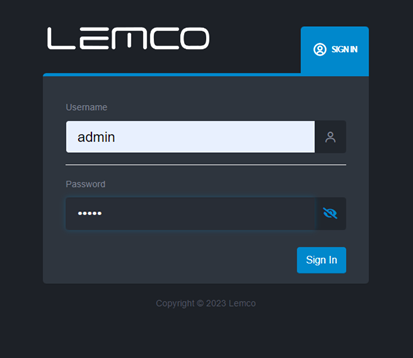
Username: admin
Password:12345
- From the following page:
o Set serial number of the device. (It will be provided by us) For the demo use: 1112240001
o Set MAC address: (It will be provided by us) For the demo use: 58:C4:1E:30:01:9E
o Set the Super admin password: lemco:2006
o And click the Save button.
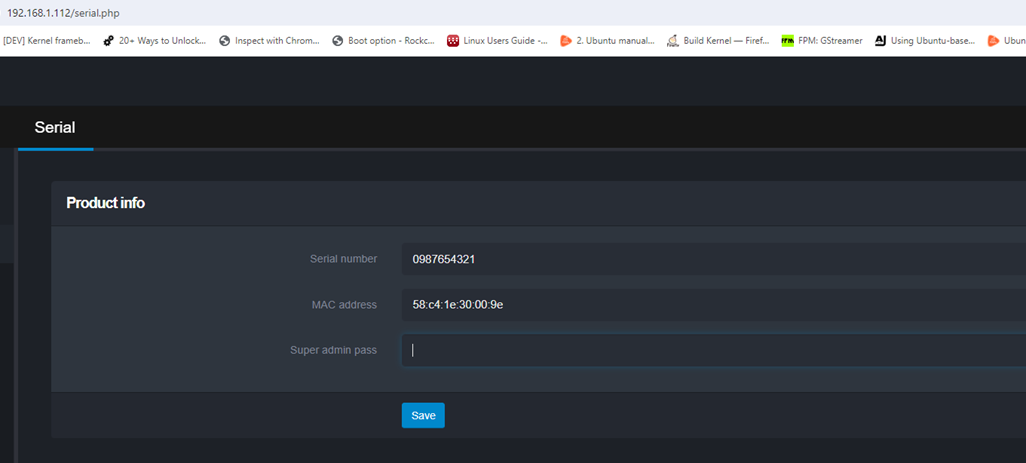
If the above step is successful, then the test procedure is finished since the network of the device and the web server is working ok!
Updated by Constantinos Lempidakis over 1 year ago · 2 revisions