All Devices » History » Revision 1
Revision 1/7
| Next »
Constantinos Lempidakis, 12/20/2024 11:30 AM
All Devices
- The "All Devices" page is a list page depicting all the available devices.
- It includes all the fields parameters like in Fleex DS
- It incluses the same style, functionality etc like Fleex DS.
Device Edit
When the user will click the edit button the following pop-up is displayed:
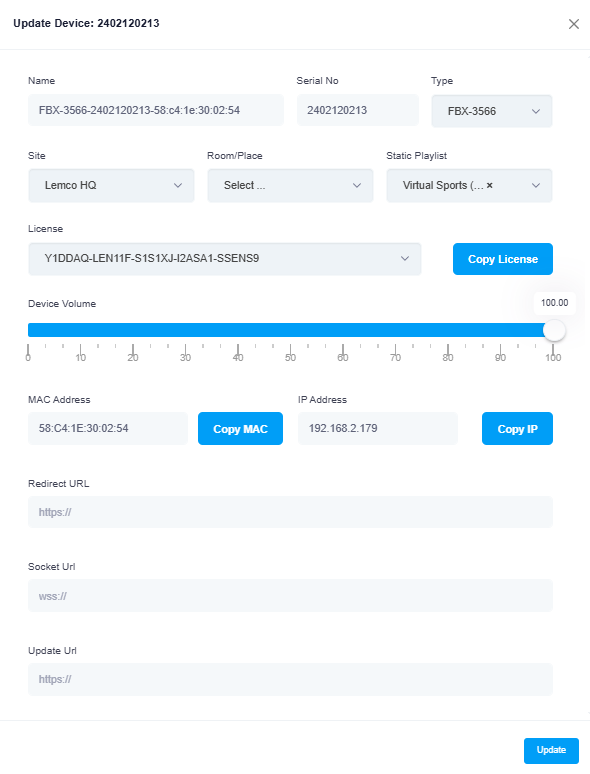
Based on the above which is inherited from Fleex DS we've the following specifications:
Based on the vendor the pop-up displays different parameter and options as follow:
LG vendor
Vendor Name (Text type)
Part number (Text type)
Serial number (Text type)
IP address (Text type)
MAC address (Text type)
Site (Select type)
Room (Select type)
License (Select type)
Power-up mode (Select type)
Samsung vendor
Vendor Name (Text type)
Part number (Text type)
Serial number (Text type)
IP address (Text type)
MAC address (Text type)
Site (Select type)
Room (Select type)
License (Select type)
Power-up mode (Select type)
Philips vendor
Vendor Name (Text type)
Part number (Text type)
Serial number (Text type)
IP address (Text type)
MAC address (Text type)
Site (Select type)
Room (Select type)
License (Select type)
Power-up mode (Select type)
Vestel vendor
Vendor Name (Text type)
Part number (Text type)
Serial number (Text type)
IP address (Text type)
MAC address (Text type)
Site (Select type)
Room (Select type)
License (Select type)
Power-up mode (Select type)
Lemco vendor
Vendor Name (Text type)
Part number (Text type)
Serial number (Text type)
IP address (Text type)
MAC address (Text type)
Site (Select type)
Room (Select type)
License (Select type)
Power-up mode (Select type)
Updated by Constantinos Lempidakis over 1 year ago · 1 revisions